
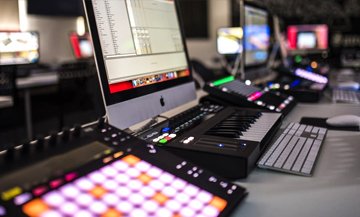
Music Production involves a lot of techniques along with artistic skills. A modern music producer should have the ability to manipulate sounds, understand synthesis in depth and know all the tools available in his DAW. Backstreets Academy is one of the best music production institute in chandigarh Our well trained faculties are not only experienced in correctly grooming a raw talent, but are industry professionals themselves who are totally well versed with Modern Music production Techniques.
Found Full information Below
Music Production Course in Chandigarh
Sound Engineering Course in Chandigarh
Mixing and Mastering Course in Chandigarh
Music Production Institute in Chandigarh
Course Content
Understanding Daw (Workflow in Daw)
Introduction and Setup
- What is a Digital Audio Workstation
- Signal Flow | Equipment You Need
- Setting Up Your System
- Audio Preferences Setting
- MIDI Preferences Configuration
- Optimizing System Performance
Ableton Live Overview
- Introduction to Session View
- Ableton’s Interface Overview
- Live’s Browser
- Loading, Playing, Stopping, Copying, and Moving Clips
- MIDI and Audio Clip Properties
- Working with Scenes
- Tempo and Meter Changes to Scenes Setting
File Management
- File Structure and Saving Live Set
- Managing Files and Folders
- Exporting Clips and Devices
MIDI Recording and Editing
- Preparation for MIDI Recording
- Recording and Overdubbing MIDI
- Entering MIDI with Computer Keyboard
- Step Sequencer Entry for MIDI
- Pencil Tool for Entering MIDI
- MIDI Editor Overview
- Quantizing | Quantizing with Grooves | Live Quantizing
- Editing MIDI Velocities
- Using Multi-Output Devices
Audio Recording and Arrangement
- Recording Audio
- Exploring Monitoring Modes
- Arrangement View Overview
- Grids in Arrangement View | Permanent Scrub Areas
- Arrangement View Recording
- Recording from Session View to Arrangement View
- Back to Arrange View Button Function
- Locators Usage
- Editing Regions in Arrangement View
- Re-Working Clips
Mixing and Routing
- Live’s Mixer
- Exclusive Arm and Solo Features
- Sends and Returns Usage
- Creating Manual Feedback for Returns
- Two Ways of Building Headphone Cues
- Grouping Tracks
Effects and Processing
- Using Effect Devices
- The Hot Swap Switch
- EQ and Filters
- Compressors and Dynamic Processing
- Delay Effect Processing Types
- Using Reverb Effectively
- Side-Chain Gating and Side-Chain Compression
MIDI Effects and Automation
- MIDI Effects
- Arpeggiator | Chord | Scale
- Keyboard Mapping | MIDI Controller Mapping | Instant Mapping
- Automation Envelopes
- Recording Real-Time Automation
- Drawing Automation Manually
- Unlinking Clip Length and Automation Length
- Editing Automation
- Using Fades and Cross-Fades
Warping and Exporting
- Warping Audio
- Basics of Warping
- Understanding All Different Warping Modes in Detail
- Transient Markers and Warp Markers
- Quantizing Audio with Warp
- Creating an Instrument Using Warp Markers
- Exporting/Bouncing Audio from Arrangement and Session View
- Isolating Chords from a Loop to Playback as an Authentic Chord
Racks and Sampling
- Live Racks
- FX Racks
- Nested Racks
- Effects in Series and Parallel
- Using FX Chains
- Instrument Racks
- Drum Racks
- Choking Samples
Arrangements and Harmony
- Composition and Structure
- Arrangement Structures
- Instrumentation and Important Instruments in a Genre
- Sample Selection Based on Genre
- Layering Samples and Synth Sounds
- FX Placement
- Automation – Filters, Pitch, Time, etc.
- Building Custom FX
Music Theory
- Basic Music Theory Rules and Secrets to Make Melodies Easily
- Extensions
- Bass and Melody
Mixing / Mastering / Recording
- Mixing Techniques
- Compressors and EQs
- Parallel Compression
- Side Chain Compression
- Side Chain Gating
Recording Workflow
-
Recording Session Setup
-
Workflow for Recording
-
Compression and EQ at Recording (Input) Stage
-
Using Reverb and Delay
-
Setting Up Separate or Multiple Headphone Cues
-
Introduction to Analog Mixing Board
Microphones and Instruments
-
Microphones
-
Working of Microphones
-
Checking Phase of the Mics
-
Concept of DT
-
DT in Guitars
-
EQ and Compression on Guitars
Drums and Vocals
-
Drums – Making and Recording a Drum Kit
-
Vocals – Recording and Editing
-
Tips and Tricks to Get Large Vocal Sound
-
Concept of Multiple Takes and Ad-Libs in Vocals
-
Understanding Types of Effects (Modulation, Filter, Reverb, Delay, Distortion, Amps, Pedals, Metering)
-
Special Effects on Vocals
-
Live Sound Recording
Music Genres
- Genres Covered
- Bollywood
- Hip Hop
- Trap
- Dubstep
- House
- EDM (Electronic Dance Music)
Projects
- Final Projects
- Mixing a Track
-
Mastering a Full Track